Thursday, 9 February 2012

Top 5 Websites for Video Chatting with Strangers Online


Are you bored of chatting with friends and relatives? You can have some wonderful time while video chatting with strangers from all over the world without disclosing your identity. This is a best alternative for facebook video chat, Google Hangouts that only permit chatting with your friends.You can make new friends or just kill some time.

Top 5 Websites for Video Chatting with Strangers Online:

Omegle   
                     
Omegle is the most popular website for video chatting with strangers. This is creation of just 18 years old boy in 2009. There is no age limit and no registration is required to chat with the strangers. Omegle server picks the random person for you to chat. In this you can also save the conversation log into your Pc and share it on Social Networking Sites like Facebook.
Click Here to visit the site
ChatRoulette:
ChatRoulette is another good website to chat with strangers. This is created by the Russian school boy. There is no age limit and registration required to get start with this. This web based application uses peer-to-peer connection. You can also report the inappropriate videos and users, which is the good feature of this site.
Click Here to visit the site
TinyChat:
TinyChat is the fastest growing network over the internet. In this you can make friends and also can chat with strangers. You can also create your own chat rooms to have private conversation with people from all around the world. To get started with this you must have latest adobe flash player installed on your PC. You can Sign in via your Facebook and Twitter account and share YouTube videos as well.
Click Hereto visit the site
LolliChat:
 is the best alternative of Omegle and ChatRoulette. In this you can chat with strangers with no age limit and registration. This will randomly select your partner. This will automatically delete all your chat logs when you disconnect.
Click Here to visit the site
6Rounds:
6Rounds is the only online website available on the internet where you can do more than chatting with strangers. Here you can play online real time games, Listen Mp3 songs, Watch youtube videos and Intract with facebook friends as well. The only limitation of this site you have to register yourself to get started and you must be atleast 18 years old.
Click Here to visit the site
There are lots of another websites on the internet but these the best sites that we have ever experienced for chatting with strangers online.
If you have any recommendations to improve this list, do let us know via comments

Methods To Recover a Memory card Password


 Method 1:

1. You must First Install a file explorer like Fexplorer or x-plore
2. Search the “mmcstore” file in  the system folder in c drive.
3. This file is actually used to store memory card passwords in a mobile phone. Rename this file to mmcstore.txt and open with notepad.
4. Now you will see the memory card password
5. Mobile manufactures are now aware of this trick, and nowadays they use better encryption methods to block access to the passwords.

Method 2:

This method is helpful for those who do not have any hex file editor in their phone. What you need to do here is , Just connect the phone to PC and move the same file to pc. Then by opening the file in you computer by any text editors like note pad or MS word you can see the password.
Method 3:

The first two methods to recover the password of memory card will not work on Nokia N series and Nokia E series Models. We have one more trick for these models. that is by using remote lock feature. For this go to your phone settings-security-Phone and Sim- and then allow Remote lock. The password you give while setting on the remote lock will also become the password of your memory card. If you want to change the memory card password just send a message containing your remote lock message. (To know how to use remote lock feature by sms in your phone contact Nokia care or read your phone manual or go to help in the remote lock feature setting)

How To:Recover Delete Sms In Nokia Phones


Hi friends,There exist quite a few software's to recover deleted 
SMS messages from SIM cards and phone memory, but all of 
them require you to purchase the software, However, if you 
own a Nokia phone you might be in luck, as there are very good 
chances of message recovery from your cellphone without 
need of any specialized data recovery software for free, simply 
follow the step-by-step procedure below for important data recovery:


  1. Download and install this free mobile File Manager - FExplorer
  2. Launch FExplorer and navigate to C: if you use Phone Memory to store your messages (default) and D: if you use Storage Card as your SMS storage location.
  3. Now navigate to and open “system” folder.
  4. Now open the “mail” folder.
  5. This folder should contain many folders named similar to 0010001_s etc. with files named similar to 00100000 etc., These files are the actual deleted messages, Simply, use the FExplorer inbuild text viewer to view these files, You will need to browse through every folder and open all files inside them until you get the required SMS.
  6. Do Note that this trick does not work on Symbian 3rd Edition cellphones.

Monday, 23 January 2012

New Colourful Facebook Text Chat !! Exclusive Facebook Trick !!!

Colorful Message in FBFacebook has restricted its user to chat in black text due concerns of server overloading and speed. But now you are no longer bound to chat in black text. There are some special codes for you that empower you to send colourful text in chat. This trick is solely based on the fact that when profile ID’s are inserted in between square brackets, it automatically transforms into the profile picture. These ID’s are specially created for this purpose.
You can also send messages in colourful text but these codes will not work in Status update. This will also not work if the other person is using chat from his mobile.

How to Send Colourful Text in Facebook Chat:

Here is the list of codes with their alphabets:
[[107015582669715]] = A
[[116067591741123]] = B
[[115602405121532]] = C
[[112542438763744]] = D
[[115430438474268]] = E
[[109225112442557]] = F
[[111532845537326]] = G
[[111356865552629]] = H
[[109294689102123]] = I
[[126362660720793]] = J
[[116651741681944]] = K
[[115807951764667]] = L
[[106596672714242]] = M
[[108634132504932]] = N
[[116564658357124]] = O
[[111669128857397]] = P
[[107061805996548]] = Q
[[106699962703083]] = R
[[115927268419031]] = S
[[112669162092780]] = T
[[108983579135532]] = U
[[107023745999320]] = V
[[106678406038354]] = W
[[116740548336581]] = X
[[112416755444217]] = Y
[[165724910215]]        = Z

 How to Use it:

To create a word of colourful text copy the codes of alphabets and make sure to insert single space between the each alphabetic code.
Here is the code for COMPUTER TRICKS :

COMPUTER: [[115602405121532]] [[116564658357124]] [[106596672714242]] [[111669128857397]] [[108983579135532]] [[112669162092780]] [[115430438474268]]  [[106699962703083]]
 TRICKS: [[112669162092780]] [[106699962703083]] [[109294689102123]] [[115602405121532]] [[116651741681944]] [[115927268419031]]

Facebook Blue Text Status Update

New Facebook Blue text status update .It uses the same concept of Profile ID’s.However the only limitation of Blue colored status trick is that you status will be in the form of link and it will point to the the profile ID used in the status.

Trick to Update Facebook Status in Blue Text:

@[1: ]@@[1:[0:1: Type Here]]

How To Use :
Copy & Paste into your Status Update Box, Just Replace "Type Here" with your Text. Rock with your Blue Text Update. Don`t Forget to Share...

Monday, 16 January 2012

Easily Search Videos on YouTube !! Secret Tricks !!!

As per the latest statistics of youtube 48 hours of videos are uploaded each minute.Now,you can imagine the number of videos that are available on youtube.It is the third most visited website on internet according to alexaranking.Youtube has its search algorthim that gives relevant results most of the time.But like Gmail and Google it has also its own search operators that increases your search relevancy to much higher levels than a normal search.

How to Search Videos on You Tube Easily:

Search You Tube channel:

If you want to search a video on a particular channel of a YouTube then add a wordchannel with your query separated by comma. See this example:
Royal wedding, channel

Force YouTube to include a term by using “+” sign

Sometimes youtube drops some of your words during search.You can force youtube to include those words by prceding the word with “+” sign.

Search High-Quality Videos:

If you want only High Quality search results for your query then in the search field give your query and HD functions with it separated by comma. This will give you either 720p (1280*720) or 1080p (1920*1080 Pixels) search result.
The king’s speech trailer, HD

Search 3D Video Clips:

For this in the search field give your query and a word 3D separated by comma. This will show all 3D video clips related to your query.
Avatar, 3D

Search for Playlists:

To search an album or playlist of any singer then in the search field give singer name and a function playlist separated by comma.
Metallica, playlist

Use of Dual Functions:

You can also mix any of the above functions together to get more accurate search results.
Mission impossible +2011, HD

HOW TO RESET PASSWORD OF WINDOWS 7 WITHOUT KNOWING PASSWORD

HOW TO RESET PASSWORD OF WINDOWS 7 WITHOUT KNOWING PASSWORD 

In case you forgot windows passsword,you can reset it using windows 7 Dvd or OfflineNT Password and Registry Editor.However if you have access to any windows account then you can change the password without knowing current password.
HOW TO RESET PASSWORD OF WINDOWS 7 WITHOUT KNOWING PASSWORD               
  • Go to Control Panel and click on the Administrative Tools  
  • Under this section double click on Computer Management.
  •  Select  System Tools from right window pane.

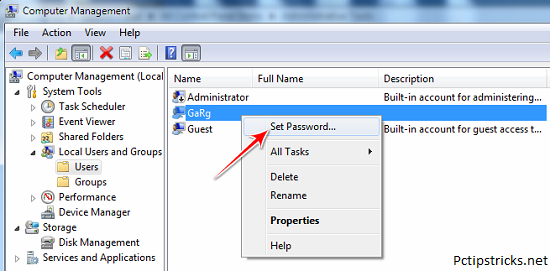
  • Under this, just double click on Local Users and Groups and then on Users
  • Now you will see all the login accounts of your computer. Right click on any the account whose password you want to change and then click on Set Password.

  • A warning message will popup on your screen just click on Proceed button.

  • Now enter your New Password  and click on OK button.


That’s it! your windows 7 password is changed without knowing current password. The only limitation of this method is that your current  account should  have Administrative privileges.